




LLM Brains

plugins.jetbrains.com/plugin/28522-llm-brains
LLM Brains is a JetBrains IDE plugin that adds a toolbar button to launch popular CLI coding agents directly in their own IDE terminal window. Works with all JetBrains IDEs (IntelliJ IDEA, PhpStorm, WebStorm, PyCharm, etc.).
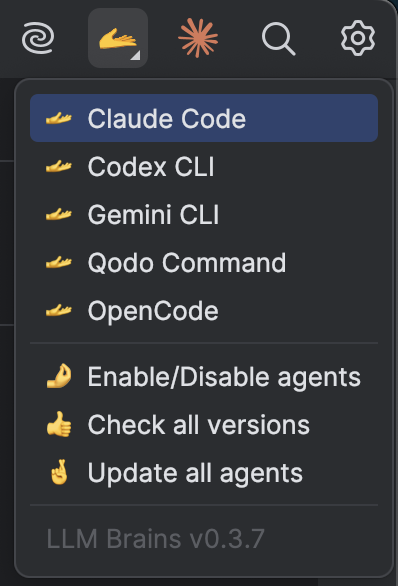
Features
- One-click access to CLI coding agents from the IDE toolbar (🫴 icon)
- 14 built-in agents with auto-detection of installed tools
- Custom agent support - add your own CLI tool with configurable name, command, and URL
- Check & Update utilities to manage all agents at once
- Configurable - enable/disable agents via Settings > Tools > LLM Brains
- Cross-platform - works on macOS, Linux, and Windows
Supported CLI Agents
| Agent | Command | Provider | Installation |
|---|---|---|---|
| Amp CLI | amp |
Sourcegraph | npm install -g @sourcegraph/amp |
| Claude Code | claude |
Anthropic | npm install -g @anthropic-ai/claude-code |
| Codex CLI | codex |
OpenAI | npm install -g @openai/codex |
| Copilot CLI | copilot |
GitHub | npm install -g @github/copilot |
| Crush CLI | crush |
Charm | npm install -g @charmland/crush |
| Droid CLI | droid |
Factory AI | curl -fsSL https://app.factory.ai/cli \| sh |
| Gemini CLI | gemini |
npm install -g @google/gemini-cli |
|
| Goose CLI | goose |
Block | curl -fsSL https://.../download_cli.sh \| bash |
| Grok CLI | grok |
xAI | npm install -g @vibe-kit/grok-cli |
| OpenCode | opencode |
OpenCode AI | npm install -g opencode-ai |
| Qodo | qodo |
Qodo | npm install -g @qodo/command |
| Qwen Code | qwen |
Alibaba | npm install -g @qwen-code/qwen-code@latest |
| VT Code | vtcode |
vinhnx | npm install -g @vinhnx/vtcode |
| Warp CLI | warp |
Warp | brew install --cask warp-cli |
Custom Agent
In addition to the built-in agents, you can configure your own custom CLI agent:
- Go to Settings/Preferences > Tools > LLM Brains
- Enable the Custom Agent checkbox
- Configure:
- Name: Display name shown in the dropdown (e.g., "My Agent")
- Command: The CLI command to execute (e.g.,
myagent) - URL: Documentation URL for reference
Your custom agent will appear in the dropdown menu alongside the built-in agents.
Usage
Click the 🫴 icon in the top right corner of the IDE to access:
- Agent actions - Launch any enabled agent in a new terminal tab
- Check what's installed - Shows version info for all agents (or install hints for missing ones)
- Update all agents - Updates all enabled agents to their latest versions
Installation
- Open your JetBrains IDE
- Go to Settings/Preferences > Plugins > Marketplace
- Search for "LLM Brains"
- Click Install and restart the IDE
Or install from the JetBrains Marketplace.
Configuration
Go to Settings/Preferences > Tools > LLM Brains to:
- Enable or disable specific built-in agents in the dropdown menu
- Configure a custom agent with your own CLI tool
Requirements
- JetBrains IDE 2024.1+ (platform version 251, 252, 253)
- Terminal plugin (bundled with all JetBrains IDEs)